
Cost to Complete: Connecting Field Progress to Job Costs in Real Time
Of all the numbers on a job report, the cost to complete is the first to go bad. Cost to date comes out of the ledger, so it’s at least a fact. Progress comes from the field. Cost to complete is a forecast somebody made on a particular Tuesday, and it starts going stale as soon as it’s typed.
Prices moving make that worse. Associated Builders and Contractors said in its September release that nonresidential construction input prices were 8.8% higher in August than a year earlier. A forecast made in spring can be off by fall without anyone having done anything wrong.
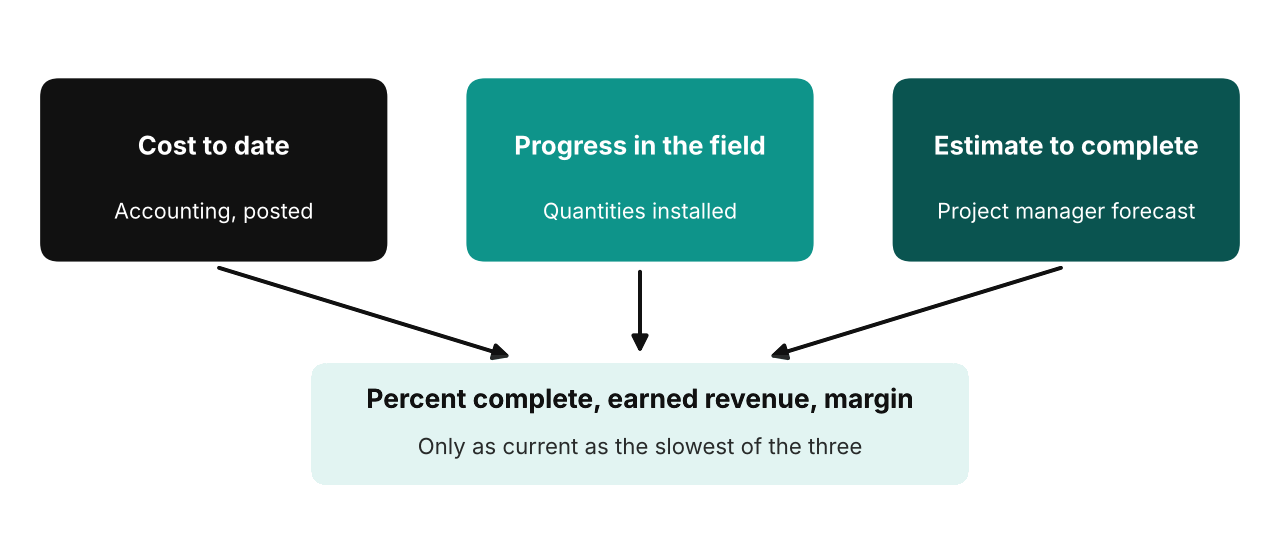
Figure 1: Three numbers, three owners
Three numbers, three owners
Percent complete, earned revenue and margin all hang off the same three inputs. Accounting costs to date. The field owns progress, meaning what’s physically installed. The project manager owns the estimate to complete. Every piece of construction project management software promises “real time”, and it sounds like a feature of the software. In practice, it’s a deal between those three people about who update what, and how often.
If one of them falls behind, the report still looks confident. It’s just wrong.
What a stale budget does, in numbers
On the Business Central project management side, which ProjectPro is built on, there are five WIP methods, percentage of completion among them. Microsoft’s documentation (last updated April 2026) gives the calculation as recognized sales equal to the billable total price times a completion percentage, where that percentage is actual total cost divided by budget total cost. It adds that the billable price and budget must be right for the whole project, or the answer won’t be.
Take some invented numbers. A $1,000,000 contract with a cost budget of $800,000, and $480,000 spent. The formula says 60% complete, so $600,000 of revenue is recognized and the expected margin is $200,000.
Now say the project manager knows costs will actually finish at $1,000,000, and nobody has updated the budget. Against the true figure, $480,000 is 48%, and revenue would be $480,000. So $120,000 has been recognized too early, and the margin the report is promising has quietly dropped to zero.
The field gives you a cheap cross-check. Say the crew’s installed quantities put the job at about 45% done while the cost method says 60%. Costs are running ahead of progress. A ballpark extrapolation, $480,000 divided by 0.45, lands near $1.07 million. Back-of-envelope, and no substitute for a proper forecast, but a gap between those two percentages is worth chasing.
What field to office integration has to carry
Say “field integration” and people picture the whole daily log flooding into the office. Most of it can stay put. The forecast needs less: quantities installed against each cost code, hours worked, materials received, and changes that affect scope. Get those arriving weekly, on the same cost codes the budget uses, and you can compare progress with cost line by line. If the field tracks work in one structure and accounting codes it in another, percent complete tracking falls apart whatever software you buy.
What ProjectPro says about this
ProjectPro’s capability pages talk about real-time job profitability data, the exact cost of work installed to date, and flags for problem areas across tasks and categories. The progress billing page says billing can run on percent, unit or lump sum, and that it aligns costs with percentage of completion in real time. It also mentions tracking estimated costs, recognized revenues and projected profits.
What the pages leave out is how the estimate to complete gets calculated, and who updates it and when. So ask, in any demo, ProjectPro’s included: show me where the estimate to complete lives for one job, who changed it last, and what happens to percent complete the moment they change it. Then ask your current system the same thing.
A thirty-minute weekly habit
Pick your five riskiest jobs. Once a week, have each project manager confirm or change the estimate to complete, compare field percent complete with cost percent complete, and flag any job where the two are more than a few points apart. Nothing fancy. It works because job cost forecasting stops waiting for month-end.
See cost to complete in ProjectPro
If you want to see how ProjectPro connects job costs, progress billing and project management on one of your own jobs, request a demo. Bring a job where the forecast caught you out. You can also read about ProjectPro’s progress billing and construction project management capabilities, or visit the Netsmartz ProjectPro page.
FAQs
It’s the amount you still expect to spend to finish a job. Added to cost to date, it gives your estimated cost at completion.
There are several methods. A common one divides cost to date by the estimated total cost, and others use installed quantities or milestones. Agree the method with your accountant.
Because someone has to update it, and prices, scope and productivity keep changing in the meantime.
Yes, it’s one of the five WIP methods for Microsoft documents.