All-In-One Construction Accounting Software

The CFO’s ERP Checklist Every Contractor Should Bring to CFMA 2026

Every May-June, thousands of construction financial leaders gather for one of the biggest construction accounting events in North America: the CFMA Annual Conference and Exhibition.

In 2026, the event heads to Phoenix from May 30 through June 3, where vendors will be pitching, booths will be packed, and every sales rep will have a reason why their platform is the one.

For a CFO, that noise is dangerous.

Choosing the wrong construction ERP software is not a one-quarter problem. It is a multi-year commitment that can disrupt project financials, delay reporting cycles, and leave your team stitching together spreadsheets long after go-live.

This checklist gives you a structured framework to evaluate any construction management software before, during, or after the CFMA Conference 2026, so you leave Phoenix with a decision, not just a tote bag full of brochures.

Why CFMA ’26 is the Right Time to Evaluate Your ERP

This construction financial management conference is not just a networking event. It is the one room where CFOs, controllers, CPAs, and surety professionals gather to talk openly about what is working and what is not, including the technology running their back office.

This year’s agenda covers AI adoption, tax strategy, talent recruitment, and financial reporting, all decisions that sit directly on top of your ERP infrastructure. Meanwhile, the exhibition floor puts dozens of construction ERP software vendors within a short walk of each other.

That is a rare opportunity, but only if you know what to ask.

Before you walk the expo floor at CFMA Conference 2026, arm yourself with these non-negotiable criteria.

The CFO’s 7-Point Construction ERP Checklist

Evaluating construction ERP software at a busy conference is harder than it looks. Every vendor will show you a polished demo. Your job is to pressure-test what sits underneath it.

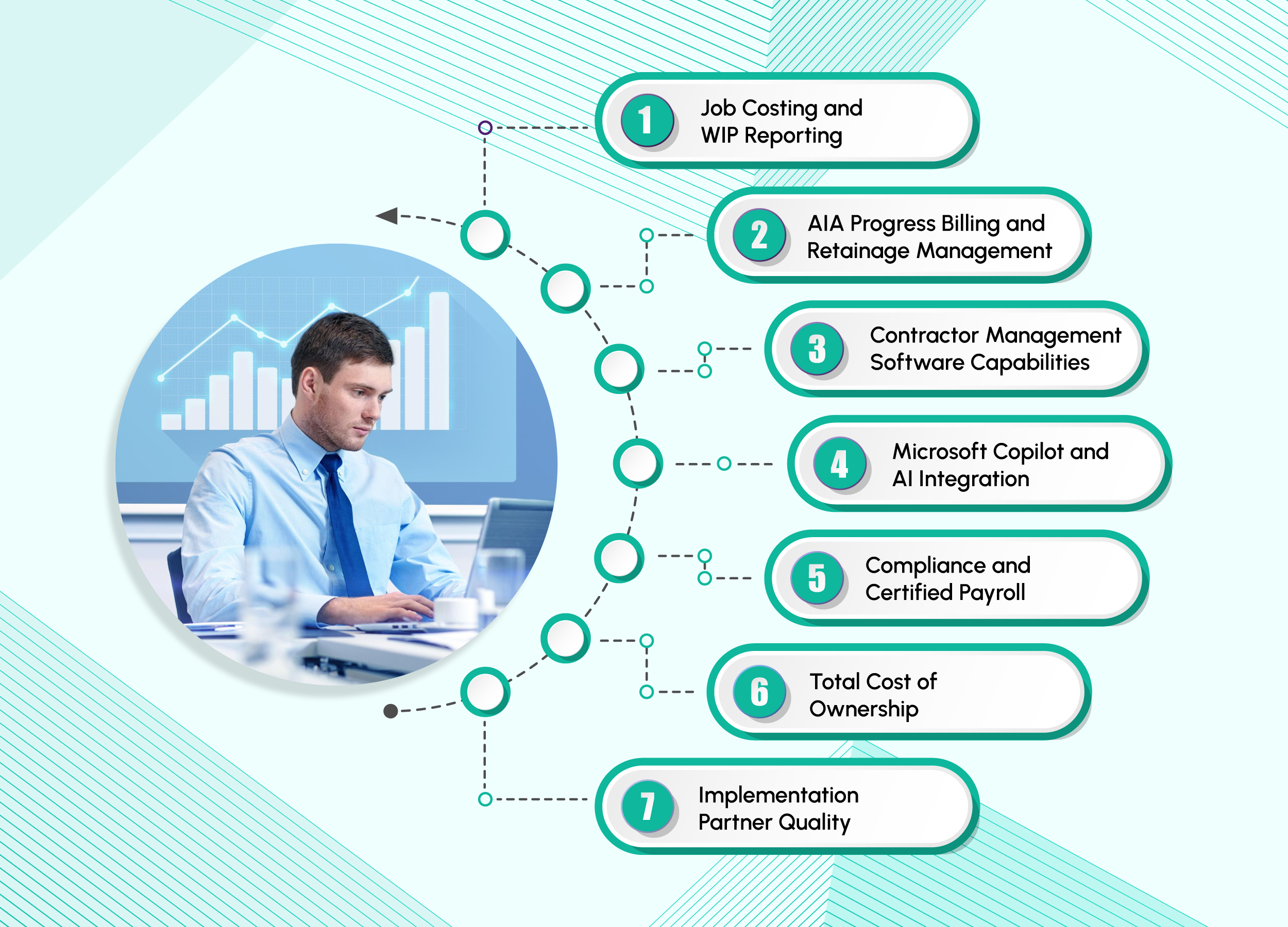
Here are the seven criteria that separate a system built for construction finance from one that just looks like the part:

1. Job Costing and WIP Reporting

This is the foundation of any serious construction ERP software. You need real-time cost-to-complete figures, budget versus actuals at every cost code level, and WIP schedules that hold up to auditor scrutiny. A multi-level work breakdown structure is not a bonus feature; it is baseline functionality. Without it, every financial close becomes a scramble across spreadsheets and phone calls.

CFOs can ask, “Does the job cost functionality provide accurate WIP accruals for underbilling and overbilling?”

If the answer involves exporting data into Excel to reconcile manually, keep walking.

2. AIA Progress Billing and Retainage Management

For contractors working on commercial projects in North America, AIA billing is non-negotiable. Your construction ERP software should natively generate G702 and G703 pay applications, not rely on workarounds or third-party add-ons. Retainage tracking must function seamlessly across both accounts payable and accounts receivable, with a complete audit trail that satisfies bonding companies and auditors.

The system should also support retainage percentages at both the overall contract level and individual line-item level, as retainage terms often vary across scopes, subcontractors, and billing schedules.

3. Contractor Management Software Capabilities

Generic ERP platforms are not built for the complexity of subcontractor relationships. Strong contractor management software should track subcontract commitments, automate lien waiver collection, monitor insurance certificate expirations, and enforce compliance before payments are released. These are not administrative tasks they are financial controls.

CFOs can ask: “How does the system flag a subcontractor who has not submitted a lien waiver before we release payment?” If the answer is, “Someone on your team monitors that manually,” then that is your answer.

4. Microsoft Copilot and AI Integration

Artificial intelligence is no longer a future consideration for construction ERP software it is a present-day differentiator. Look for AI assistants that understand your role and allow you to ask questions about job costs in plain language, identify unexpected cost increases or billing delays early, and automate accounts payable processing without manual effort.

Platforms built on Microsoft Dynamics 365 embed Microsoft Copilot directly into ERP workflows.

That means a CFO can ask, “Which projects are at risk of margin erosion this quarter?” and receive an answer based on live data, not a static report generated manually.

5. Compliance and Certified Payroll

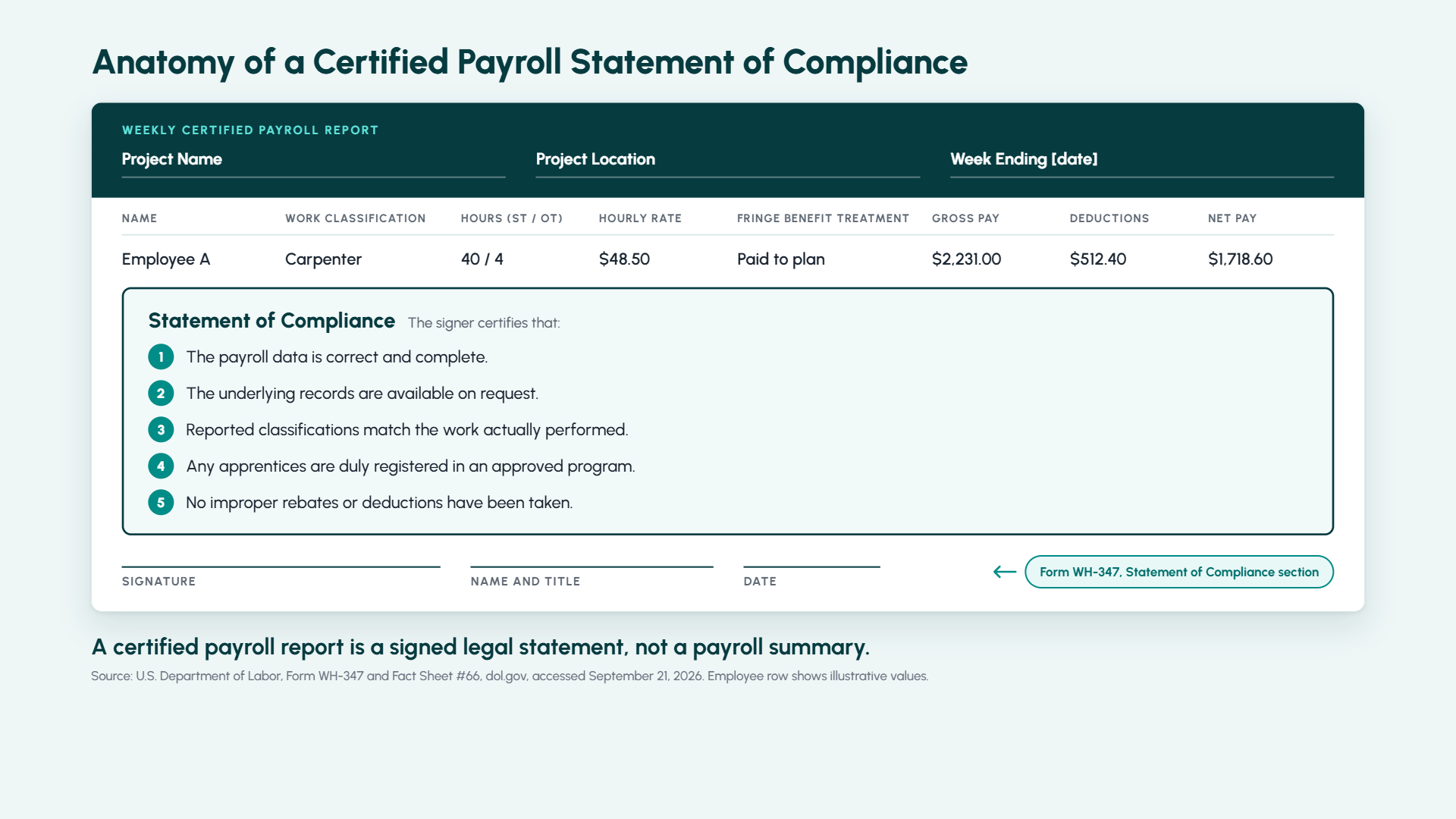
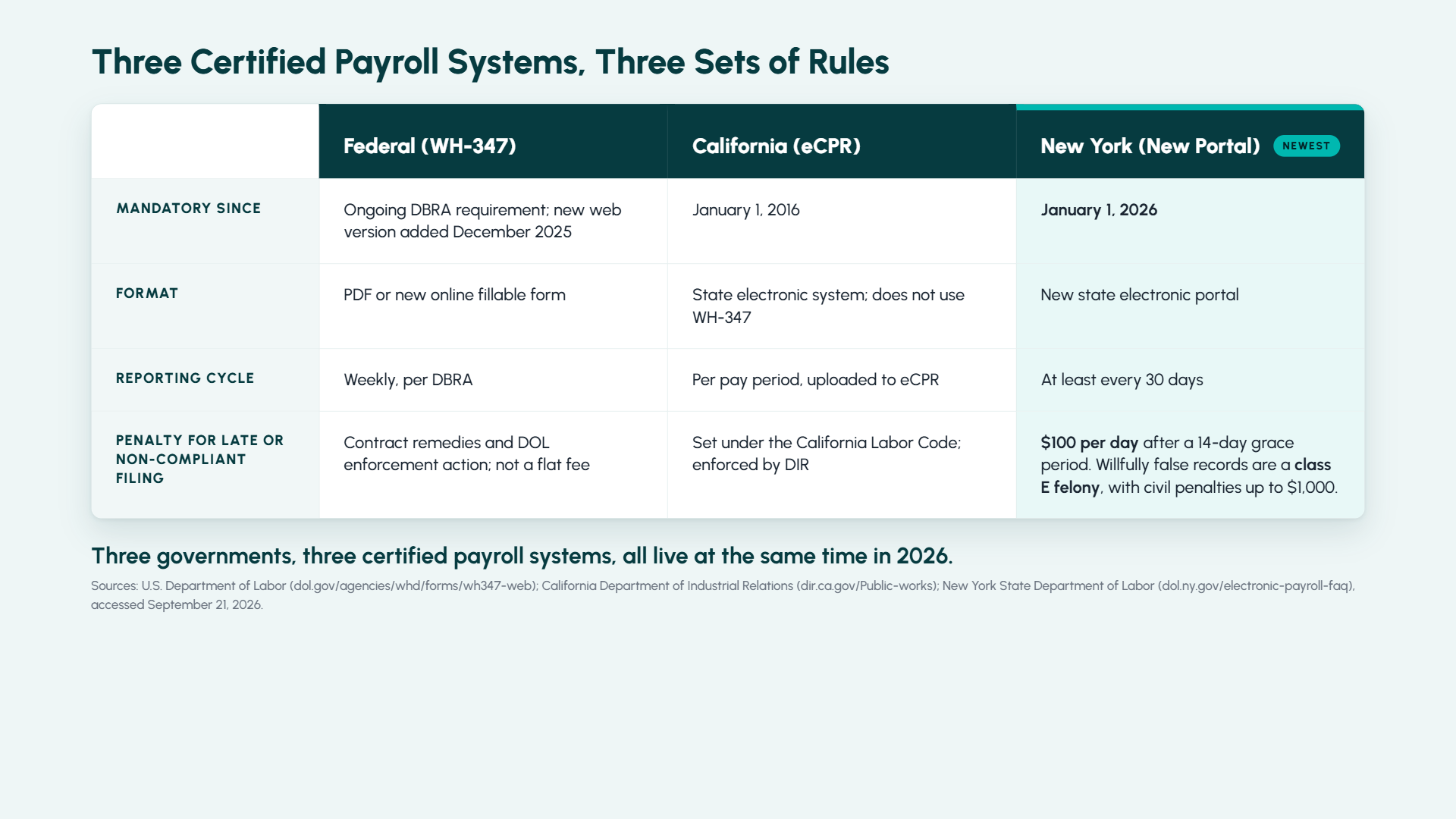
For contractors operating across multiple states or on publicly funded projects, payroll compliance is a legal requirement, not an operational preference. Your ERP should support Davis-Bacon prevailing wage calculations, multi-state and multi-union payroll, fringe benefit tracking, and automated certified payroll reporting.

Ask specifically how the system manages prevailing wage updates, union rules, tax jurisdictions, and labor compliance requirements across different states and project types. If compliance workflows still rely on spreadsheets or manual adjustments outside the ERP, that represents a significant risk.

6. Total Cost of Ownership

The license fee is only a small part of the total investment. Implementation, data migration, customization, user training, and ongoing support determine the true cost over a five-year period. A CFO should evaluate functional fit, total cost of ownership, implementation timeline, delivery risk, and internal control requirements when assessing any ERP system.

Ask vendors for a full three-year cost projection and request references from companies similar to your revenue size, rather than their largest enterprise clients.

7. Implementation Partner Quality

The software decision is only half of the equation the implementation partner is equally critical. Evaluate their construction industry experience, approach to scoping and change management, and ability to manage go-live risk.

At major construction events in North America like CFMA 2026, you have direct access to peers who have recently completed ERP implementations. Ask them which partner they used and whether they would choose them again.

What the Best Construction ERP Software Looks Like in 2026

The expectations for construction ERP software have changed significantly.

CFOs are no longer looking for systems that only store financial data. They expect platforms that surface insights, flag risk proactively, and reduce manual reporting effort.

Platforms like Microsoft Dynamics 365 Business Central with integrated Microsoft Copilot capabilities are helping redefine that standard.

Modern construction ERP platforms enable finance teams to:

  • Query live project financials using plain language
  • Receive early alerts on margin risks and cost overruns
  • Automate accounts payable workflows
  • Improve visibility into cash flow, billing, and profitability
  • Reduce delays caused by disconnected systems and manual reconciliations

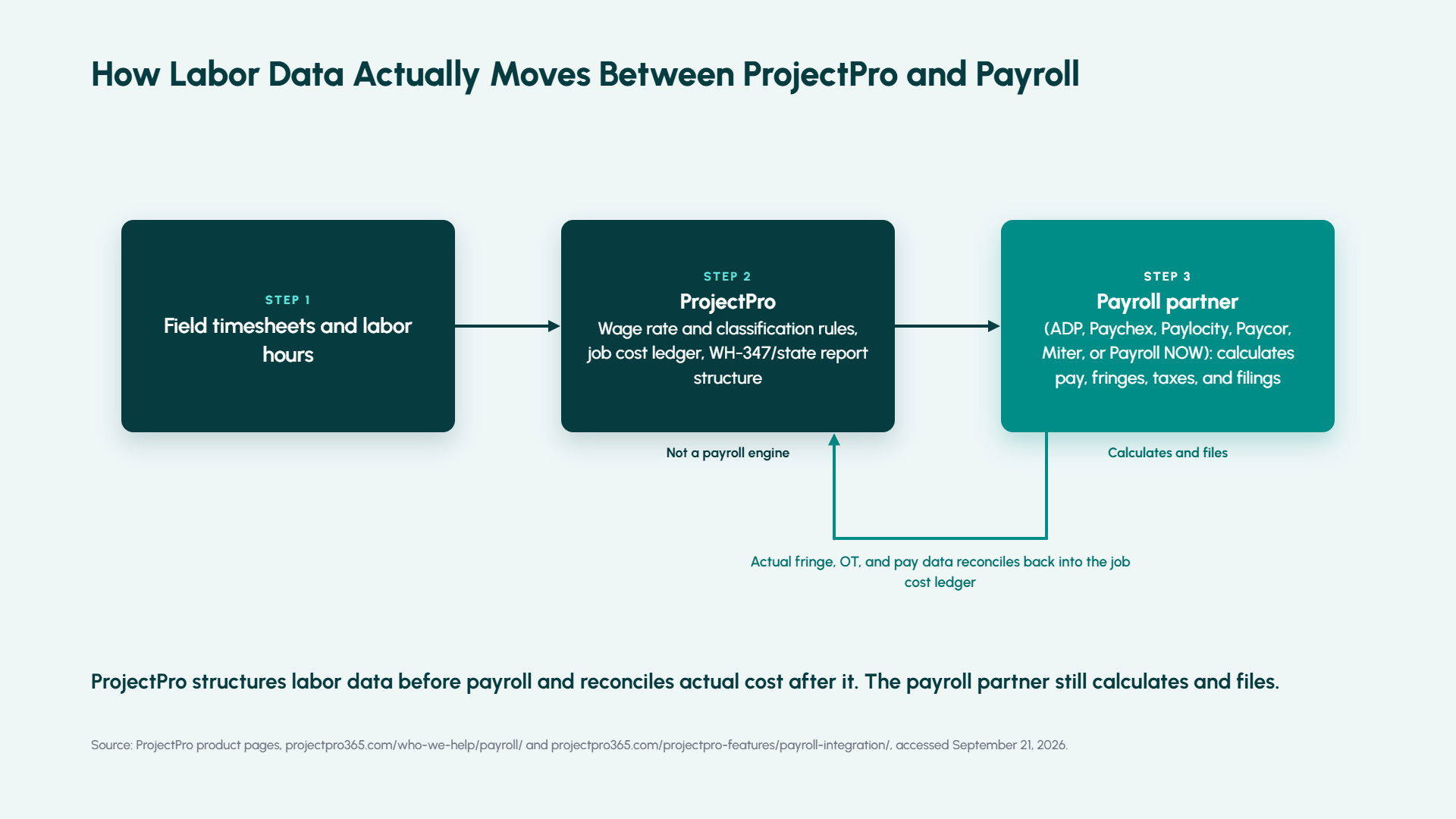
Purpose-built construction solutions like ProjectPro, an agentic construction management solution, extend these capabilities with construction-specific functionality, including:

  • Advanced job costing
  • Subcontractor management
  • Certified payroll
  • Project controls and compliance workflows
  • Retainage and progress billing management

The right platform eliminates data silos between the field and back office, giving construction professionals stronger financial visibility and better operational coordination. Firms using integrated contractor management software within their ERP often report faster month-end close cycles, improved cash flow forecasting, and more reliable project reporting across the organization.

Make Your ERP Decision with Confidence, Not Conference FOMO

Whether you are walking the expo floor at CFMA Conference 2026 in Phoenix or evaluating options from your office, one thing remains true: ERP selection is too consequential to leave for a 20-minute vendor demo and a branded water bottle.

Use this checklist to pressure-test every platform you see, from job costing depth and AIA billing to Microsoft Copilot capabilities and total cost of ownership. The right Construction ERP Software will show its strength under that scrutiny. The wrong one will deflect.

Netsmartz brings over 25 years of construction technology expertise, helping contractors modernize financial management, project operations, and field collaboration on Microsoft solutions.


FAQs

CFOs should evaluate whether the construction ERP software supports real construction finance workflows, including job costing, subcontractor compliance, retainage tracking, certified payroll, and real-time cash flow forecasting.

At CFMA Conference 2026, it is important to look beyond polished demos and assess how the platform performs in real-world construction accounting environments.

Strong contractor management software helps construction firms manage:

  • Subcontractor commitments
  • Lien waivers
  • Insurance compliance
  • Retainage tracking
  • Project documentation

Integrating these workflows within your ERP improves financial accuracy, reduces manual processes, and strengthens project oversight.

Microsoft Copilot is helping modern construction finance teams work more efficiently by:

  • Providing natural language access to project financials
  • Automating repetitive accounting tasks
  • Identifying margin risks earlier
  • Delivering live insights directly from ERP data

Instead of relying on static reports, CFOs can access real-time operational and financial insights directly from their ERP environment.

Events like the Construction Annual Conference and Exhibition allow finance leaders to:

  • Compare ERP platforms
  • Evaluate emerging technologies
  • Learn from peer implementation experiences
  • Explore best practices in construction finance

As one of the leading construction events in North America, CFMA gives CFOs practical insight into improving financial visibility, project controls, and operational efficiency.

Events like the Construction Annual Conference and Exhibition allow finance leaders to:

  • Compare ERP platforms
  • Evaluate emerging technologies
  • Learn from peer implementation experiences
  • Explore best practices in construction finance

As one of the leading construction events in North America, CFMA gives CFOs practical insight into improving financial visibility, project controls, and operational efficiency.

5 Ways Subcontractor Management Software Improves Project ROI

Walk onto any major construction job site and one fact becomes obvious quickly. The majority of work is not done by the general contractor’s direct workforce. It is delivered by subcontractors.

Electricians, HVAC specialists, concrete teams, drywall installers, steel fabricators, and dozens of other trades keep projects moving forward. In many projects, subcontractors handle most of the execution.

Industry data shows that 65% of construction firms rely on subcontractors for more than 75% of their project volume, highlighting how critical subcontractor coordination is to project success.

Yet many firms still manage subcontractors using spreadsheets, email threads, and paper-based documentation. As project complexity grows, these disconnected systems create blind spots that lead to schedule delays, payment disputes, compliance risks, and budget overruns.

Modern subcontractor management software helps construction firms bring order to this complexity. By centralizing subcontractor data, automating workflows, and connecting field operations with accounting, contractors gain the visibility they need to manage projects more confidently.

Why Subcontractor Management is Becoming More Complex

The construction industry has changed dramatically in the last decade. Projects are larger, supply chains are more volatile, and compliance requirements are increasing.

At the same time, subcontractor coordination has become far more demanding. Modern projects often involve dozens of specialized subcontractors working across multiple phases, locations, and timelines.

When communication, documentation, and cost tracking are handled in separate systems, project managers struggle to answer critical questions such as:

  • Which subcontractor scopes are currently active?
  • Are insurance and compliance documents still valid?
  • How do subcontractor costs compare with project budgets?
  • Is work progressing according to schedule?

Without real-time answers, project leaders often make decisions based on incomplete information.

That is why many contractors are investing in modern subcontractor management software to bring operational and financial visibility into one system.

5 Ways Subcontractor Management Software Improves Project ROI

Construction companies that implement a dedicated construction subcontractor management system gain more than operational convenience. They improve productivity, reduce risk, and strengthen financial performance. Below are the real business benefits construction firms realize when they invest in the right technology.

Improved Productivity and Visibility

Good subcontractor tracking software gives you full visibility into each subcontractor’s performance. You no longer wait for weekly reports or sift through emails to know whether work is on schedule.

With robust subcontractor management software, managers have instant access to subcontract scopes, progress reports, change orders, and task completion timelines. This clarity leads directly to more productive teams, fewer bottlenecks, and faster project delivery.

Automation of Critical Administrative Tasks

Manual processes are slow, error-prone, and expensive. Construction subcontractor management system automates key administrative workloads such as:

  • Generating contracts and change orders
  • Tracking certificates of insurance and expiration dates
  • Calculating lien waivers and payment terms
  • Syncing updates across accounting and field operations

Automation saves time and keeps everyone aligned without manual tracking.

Real-Time Subcontractor Tracking

A core advantage of subcontractor tracking software is knowing exactly where each subcontractor stands on work and compliance. Instead of searching through stacks of paperwork or Excel sheets, project managers see:

  • Active subcontracts and payment history
  • Task status and materials reconciliation
  • Change order details and billing
  • Insurance and certification compliance

This real-time visibility reduces risk and gives leadership confidence that projects are advancing as planned.

Stronger Cost Control and Job Cost Visibility

Subcontractor expenses represent a large portion of total project costs. Without accurate tracking, those costs can quickly exceed budgets.

When subcontract commitments, change orders, and invoices are tracked across disconnected systems, it becomes difficult for project teams to maintain a clear view of actual costs.

Subcontractor management software improves cost control by linking subcontract commitments directly to project budgets and job costing systems.

Contractors gain the ability to:

  • Track subcontract values against budgets
  • Monitor change orders in real time
  • Identify cost variances early

This financial visibility helps project teams protect margins before small issues turn into major overruns.

Improved Compliance and Risk Management

Compliance management is one of the most overlooked challenges in subcontractor coordination.

Insurance certificates expire. Licensing requirements change. Lien waivers must be collected before payments are issued.

Without centralized tracking, these tasks can easily slip through the cracks.

A construction contractor management software platform helps teams maintain a complete compliance record for every subcontractor. Expiration alerts, document storage, and automated reminders reduce risk and help ensure projects remain compliant throughout the lifecycle.

Subcontractor Success Starts with the Right Construction Software

Subcontractors are essential to completing complex construction work. They fill skill gaps, deliver specialized services, and keep projects moving. Without systems to coordinate work and track performance, subcontractor management can become a source of risk and unpredictability.

With robust construction contractor management software like ProjectPro, powered by Microsoft Dynamics 365 Business Central, you get one system that:

  • Tracks every subcontract engagement
  • Connects field work with accounting in real time
  • Reduces manual work and data duplication
  • Improves compliance and visibility
  • Enables AI-assisted insights with Microsoft Copilot to enhance productivity and decision-making

Ready to eliminate subcontractor chaos? Explore ProjectPro, subcontractor management software designed to help you manage projects with confidence.

FAQs

Subcontractor management software is a digital platform that helps construction teams manage subcontractor contracts, tracking, compliance, and performance in a unified system.

By giving real-time visibility into work completed, compliance status, and costs tied to each subcontract, project teams can make quicker and better decisions that improve delivery timelines.

Subcontractor tracking software ensures you know exactly where subcontracted work stands, what’s outstanding, and how costs compare to budgets, reducing surprises and improving planning.

Yes. It identifies areas of overspend, automates administrative tasks, and helps align payments with actual performance, all of which contribute to better cost control.

5 Proven Construction Project Planning Best Practices That Drive Results

Construction projects rarely fail because teams do not work hard enough. They fail because planning breaks down before execution even begins.

Recent industry insights from Deloitte (2024–2025 construction outlook) highlight that cost overruns and schedule delays remain among the biggest challenges for contractors globally, especially as projects grow in complexity and scale. At the same time, PwC reports that construction firms are increasingly investing in digital planning and project management tools to improve coordination and cost control.

Despite this, many projects still start with fragmented planning.

Schedules sit in one system. Budgets in another. Field execution follows assumptions instead of aligned plans. By the time issues surface, they are already expensive to fix.

This is why construction project planning is the foundation that determines whether a project stays predictable or becomes reactive.

The contractors who consistently deliver on time and on budget follow a structured planning approach. Not as a checklist, but as a discipline.

What Effective Construction Planning Actually
Looks Like

On a well-planned project, every team knows what needs to happen, when it needs to happen, and how it connects to cost and resources.

Project managers are not chasing updates. Finance teams are not reconciling gaps. Field teams are not waiting for clarity.

Everything flows from a plan that connects scope, schedule, resources, and financials. That level of coordination does not happen by chance. It comes from following the right construction project planning steps. Here’s how:

Define Clear Project Goals

Every successful project begins with alignment on what success actually means.This goes beyond defining deliverables. It includes financial targets, timelines, quality benchmarks, and stakeholder expectations.

When this clarity is missing, teams make decisions based on assumptions. Those assumptions later show up as delays, rework, or disputes.

Strong project planning in construction management starts by creating a shared understanding across all stakeholders. This becomes the reference point for every decision that follows.

Establish Scope and Key Deliverables

Once goals are set, the next construction planning step is defining the project’s scope.

Scope includes:

  • What Will Be Delivered
  • Materials, Systems, and Equipment Required
  • Quality and Compliance Standards
  • Work Excluded from the Contract

A detailed scope document eliminates ambiguity, reduces change orders, and enhances accountability.

Use collaborative workshops with the design team, subcontractors, and stakeholders to refine scope and avoid assumptions later.

Prioritize Internal Planning Before Execution

Before any work begins, the team must develop an actionable plan that addresses internal risks, resources, and timelines.

Key activities include:

  • Identify Risks and Assign Owners: Document potential risks (financial, schedule, safety) and assign responsibility for mitigation.
  • Align Resources and Budgets: Ensure labor, equipment, and funding are allocated and scheduled appropriately.
  • Assess Site Conditions and Logistics: Confirm permits, access, and infrastructure requirements are accounted for.

Focusing on internal preparation ensures the project team can make informed decisions and react effectively if conditions change.

Pro Tip: Document all risk mitigation strategies in a shared platform so team members can track accountability and progress.

Connect Design with Early Execution Planning

One of the biggest gaps in construction planning happens between design and execution.Design teams complete drawings. Field teams interpret them. And in between, misalignment creates delays and rework.

Integrating design with execution planning changes that. It allows teams to identify conflicts early, align schedules with actual build conditions, and ensure cost estimates reflect reality.

With tools like BIM and connected planning systems, this step is becoming essential rather than optional.

Validate Your Plan Before Breaking Ground

Before construction begins, conduct a comprehensive walkthrough to validate the plan, rather than rehashing alignment.

Key validation steps:

  • Final Scope and Design Check: Confirm deliverables match contract requirements.
  • Constructability Review: Ensure designs can be executed efficiently on-site.
  • Compliance Audit: Verify regulatory and safety standards are met.
  • Bid and Subcontractor Coordination: Confirm responsibilities and schedules with trade partners.

This step ensures gaps are caught early, minimizing costly mistakes and giving the team confidence to execute the project successfully.

Why Modern Contractors Prioritize a Structured
Planning Approach

Construction planning is evolving from static documents to connected systems. Over 78% of construction firms globally had adopted at least one digital project management tool by 2024 to improve schedule coordination, budgeting, and team collaboration.

A structured planning process helps contractors:

  • Minimize change orders
  • Reduce unexpected delays
  • Keep costs under control

Where ProjectPro Fits In

Modern planning requires more than spreadsheets and disconnected tools.

ProjectPro, built on Microsoft Dynamics 365 Business Central, connects project planning with financial management in one system.

This allows contractors to align budgets with execution in real time, track costs as work progresses, connect project planning with accounting and reporting .

Instead of managing planning and financials separately, teams operate with a unified view of the project.

Final Thoughts

Effective construction project planning goes beyond a simple checklist. It’s what sets the best contractors apart.

To reduce uncertainty and keep projects on schedule and within budget, many leading construction firms rely on ProjectPro.

This all-in-one construction ERP is built on Microsoft Dynamics 365 Business Central and backed by over 26 years of construction industry experience. It gives teams real-time visibility, streamlined workflows, and the insights they need to make smarter decisions on every project.

To discover how ProjectPro can transform the way you plan
and build, schedule a demo.

FAQs

Critical construction project planning steps include defining project goals, setting scope, developing a risk-aware plan, integrating design and execution, and conducting a full planning walkthrough before construction.

Construction project planning ensures clarity, reduces risks, aligns teams, and supports informed decision-making throughout the project lifecycle.

The construction project planning process includes goal definition, scope of development, risk planning, design integration, scheduling, and pre-construction review.

Modern teams use cloud-based project planning tools for construction, such as scheduling dashboards, BIM integration, centralized document sharing, and risk management systems.

Construction planning best practices include early stakeholder engagement, documented scope, aligned scheduling, integrated design, risk mitigation, and real-time collaboration.

Why 70% of Construction Firms are Moving to the Cloud (And Why You Should Too)

Construction projects today involve multiple teams, tight schedules, and constantly shifting costs. On top of that, managing everything through spreadsheets or disconnected tools can quickly lead to delays, miscommunication, and budget overruns.

That’s why many contractors are turning to cloud construction management software to manage projects more efficiently.

According to industry research, more than 70% of construction firms have adopted cloud technology to improve project visibility and collaboration. It highlights the rising need for technology in the construction industry.

Cloud platforms allow contractors to access project data from anywhere, track budgets in real time, and keep office and field teams aligned.

In this guide, we’ll explore five key benefits of cloud construction management software and why it’s becoming essential for modern construction companies.

Top 5 Benefits of Cloud Construction Management Software

The main benefits of cloud construction management software include the following:

1. Real-Time Project Visibility

One of the biggest advantages of cloud construction management software is real-time access to project data.

Project managers can track:

  • Project progress
  • Labor productivity
  • Budgets and cost performance
  • Material usage

Because all data is stored in a centralized system, contractors can identify potential issues early and make faster decisions.

2. Better Collaboration Between Office and Field Teams

Construction projects involve many stakeholders, including contractors, subcontractors, architects, and suppliers.

Cloud construction software allows teams to collaborate through shared dashboards, documents, and task updates.

Field teams can upload updates directly from job sites, while office teams can monitor progress and respond immediately.

This improves communication and reduces delays caused by outdated information.

3. Improved Cost Tracking and Budget Control

Cost overruns are one of the biggest challenges in construction.

With construction software for contractors, project managers can monitor:

  • Labor costs
  • Material expenses
  • Subcontractor payments
  • Equipment costs

Real-time financial visibility helps contractors identify cost issues early and maintain tighter control over project budgets.

4. Faster Project Scheduling and Time Management

Construction schedules change frequently due to weather, supply delays, or design updates.

Cloud-based construction management tools allow project managers to:

  • Update schedules instantly
  • Assign tasks to teams
  • Monitor progress across projects

This helps contractors adjust quickly and keep projects on track.

5. Scalability for Growing Construction Companies

As construction companies grow, managing multiple projects becomes more complex.

Cloud systems allow contractors to add users, projects, and features without investing in additional IT infrastructure.

This makes cloud construction management software a practical solution for both small contractors and large construction firms.

From Legacy Software to Cloud ERP for Construction Companies

cloud ERP

While many contractors begin with basic project management tools, growing construction firms often require deeper financial and operational visibility.

This is where cloud ERP for construction companies becomes valuable.

Cloud ERP platforms connect project management with accounting, job costing, procurement, and financial reporting in one system. This gives contractors a complete view of both project performance and company finances.

How ProjectPro Helps Construction Companies Manage Projects in the Cloud

Modern construction companies need more than just project tracking tools. They need a connected platform that links project management with financial management.

That’s where ProjectPro steps in. Built on Microsoft Dynamics 365 Business Central, ProjectPro helps contractors manage projects, job costs, and financial operations from a single system.

With ProjectPro, construction companies can:

  • Track labor and material costs by job
  • Monitor project budgets in real time
  • Manage subcontractors and resources
  • Automate billing and financial reporting
  • Gain full visibility into project profitability

By centralizing project and financial data, ProjectPro helps contractors make better decisions and deliver projects more efficiently.

Ready to Take Control of Your Construction Projects?

Managing projects with disconnected tools or spreadsheets can lead to delays, miscommunication, and rising costs.

With ProjectPro, contractors can manage projects, finances, and job costs on a single cloud platform. Gain real-time visibility, improve collaboration, and keep your projects on track from start to finish.

To see how ProjectPro helps construction companies work smarter, connect with a ProjectPro specialist today.

FAQs

Cloud construction management software is a digital platform that allows contractors to manage project schedules, budgets, documents, and teams through an online system accessible from any location.

Contractors use cloud construction management software to improve project visibility, streamline communication between field and office teams, and track project costs more accurately.

Cloud ERP for construction companies integrates project management, accounting, job costing, and financial reporting into a single cloud-based platform.

Construction software for contractors should include:

  • Project scheduling
  • Job costing
  • Document management
  • Budget tracking
  • Real-time reporting
  • Collaboration tools

Construction planning best practices include early stakeholder engagement, documented scope, aligned scheduling, integrated design, risk mitigation, and real-time collaboration.