All-In-One Construction Accounting Software

5 Signs You’ve Outgrown QuickBooks (And What It’s Costing Your Job Margins)

Picture this: it’s the second week of the quarter, and your bank wants an updated WIP schedule before renewing your line of credit.

Your controller exports job reports from QuickBooks, then opens WIP_Q3_FINAL_v6.xlsx. Committed costs come from project managers’ subcontract logs. Percent complete comes from emails to superintendents. Change orders come from a folder everyone hopes is current.

Three days later, the schedule is done. The hospital renovation everyone thought was running at an 18% margin is closer to 9%. The margin started slipping two months ago. Nobody saw it because the numbers showing it lived in different places.

QuickBooks reported what was in the system. The rest lived elsewhere.

Here’s our view at Netsmartz: contractors outgrow QuickBooks when the numbers that run construction, like margin, commitments, billing, and cost to complete, spread into spreadsheets around it.

Every spreadsheet around the ERP is another piece of the job living somewhere else.

Quick answer

Your construction business has outgrown QuickBooks when it can no longer serve as the central source for the numbers you use to run jobs. When WIP, commitments, job costs, billing, or other critical project data live in spreadsheets, emails, or separate tools, it’s time to consider a QuickBooks alternative for contractors.

Sign 1: Your WIP Schedule Lives in a Spreadsheet

The work-in-progress schedule is the most important report a contractor produces. It shows whether each job is making money, whether you’ve overbilled or underbilled, and what’s left to earn. Banks and sureties rely on it.

If yours is rebuilt in Excel every month or quarter, you’re only seeing margin at the moment someone finishes the spreadsheet. By then, a job that started fading in the field has had weeks to keep fading.

The test: Could you answer, “Which three jobs are losing margin right now?” today, without opening a spreadsheet?

Sign 2: You Find Out What a Job Costs When the Bill Arrives

Your PM signs a $220,000 subcontract on Monday. If that commitment isn’t recorded in the accounting system, the job cost report may not reflect the exposure until the first bill or pay app is entered.

That gap is where cost overruns can hide. Actual costs tell you what you’ve spent. Committed costs tell you what you’ve already promised to spend: signed subcontracts, open purchase orders, and approved change orders. Without both in one view, “What’s our total exposure on this job?” becomes a question for the PM’s spreadsheet instead of your accounting system.

The test: Does your job cost report include committed costs, or only bills that have been entered?

Sign 3: Billing Day Takes Days

Progress billing in construction isn’t just invoicing. It means a schedule of values, percent complete by line item, retainage, approved change orders, and often AIA G702 and G703 forms. When that lives in a separate spreadsheet or tool, every pay app means re-keying numbers and checking them twice.

The cash stakes are real. Billd’s 2026 National Subcontractor Market Report (600+ respondents, June 2026) found that subcontractors wait an average of 51 days to get paid after submitting a pay application, 64% report being slow-paid by their GC, and 83% of owner-operators are worried about cash flow.

Payment timing may be outside your control. Timely, accurate, contract-compliant pay applications are within your process.

The test: How many hours does one pay app take, from pulling percent complete to sending the invoice?

Sign 4: You’re Working Around QuickBooks’ Built-In Limits

Every QuickBooks Online plan has usage limits, and Intuit publishes them. QuickBooks Online Plus allows 5 billable users, 250 accounts in the chart of accounts, and 40 classes and locations combined. Advanced raises that to 25 users with unlimited accounts, classes, and locations.

Contractors feel these limits in practical ways. Classes get used for phases or divisions, jobs become sub-customers, and field staff may share logins or lack access. None of this breaks the books, but every workaround adds another step and another place for errors to hide.

If you’re on QuickBooks Desktop, there’s another factor. Intuit stopped selling Desktop Pro Plus, Premier Plus, and Mac Plus to new U.S. subscribers on September 30, 2024. Existing subscribers can keep renewing, but many contractors are already facing a platform decision. It makes sense to make it once, for the business you’re becoming.

The test: How many of your QuickBooks “settings” are really workarounds someone set up years ago?

Sign 5: Every Fix is Another Spreadsheet, or Another Hire

When the system can’t do something, growing contractors usually do one of two things: add a spreadsheet, or add a person to manage the spreadsheets. Over time, the back office grows faster than the business.

Hiring your way out is getting harder. In AGC and Sage’s 2026 Construction Hiring and Business Outlook (951 firms), 80% of firms reported difficulty filling salaried positions. If month-end already depends on one person who knows how the spreadsheets fit together, that’s not just inefficient. It’s a risk.

The test: If your controller took two weeks off at quarter-end, could anyone else produce the WIP schedule?

What Changes When Construction Accounting Runs in One System

A construction ERP doesn’t just add features to accounting. It puts the job at the center, so costs, commitments, billing, and field progress all update the same record.

That’s what ProjectPro, an AI-powered construction ERP built on Microsoft Dynamics 365 Business Central, is designed to do. It’s built for general, electrical, mechanical, civil, and specialty contractors managing real job complexity. Here’s how it maps to the five signs:

The sign How ProjectPro handles it
1. WIP lives in a spreadsheet WIP is tracked in the system: estimated costs, recognized revenue, and projected profit across the life of each job. Change orders update budgets, forecasts, and WIP automatically.
2. Costs show up when the bill arrives Job cost by project, phase, and cost code, with planned vs. committed material costs and subcontractor management in the same job record.
3. Billing day takes days Progress billing in AIA G702, G703, or generic formats, with schedules of values, retainage, and billing by percent complete, units, or lump sum. A pre-posting review shows the impact on the job, customer, and general ledger before you post.
4. You’re working around built-in limits Built on Microsoft Dynamics 365 Business Central, with a job structure designed for construction instead of classes and sub-customers standing in for phases and jobs.
5. Every fix is another spreadsheet or hire ProjectPro Field brings timesheets and site data into the same record, payroll integration connects your existing provider to job costing, and Microsoft Copilot is built into the system.

The Netsmartz View: Move to ProjectPro, Not Your Workarounds

As contractors move beyond QuickBooks, the focus should be on building a cleaner foundation for the business. That includes leaving behind the workarounds that have grown around the existing system.

That’s why we recommend moving to ProjectPro job-first, not data-first. Here’s what that looks like:

  1. Set up your cost codes in ProjectPro first. Define phases and cost codes once, so every job reports the same way, with job cost by project, phase, and cost code from day one.
  2. Bring open jobs forward with the full picture. Move open contracts, commitments, billed-to-date amounts, and retainage balances into ProjectPro, so your first WIP report is complete rather than rebuilt.
  3. Go live on WIP and progress billing first. That’s where spreadsheets cost you the most. In ProjectPro, change orders update budgets, forecasts, and WIP automatically, and pay apps go out in AIA G702 and G703 formats.
  4. Keep your payroll provider. ProjectPro integrates with ADP, Paychex, Payroll NOW, and Paylocity, so payroll keeps running while labor costs flow into job costing.
  5. Retire the spreadsheet after one side-by-side close. Close one month in both, compare WIP, and then make ProjectPro your system of record.

The goal is a connected business process where the WIP schedule, job cost report, and pay application all come from the same place. That’s what ProjectPro is built for.

The Bottom Line

You won’t get an error message telling you you’ve outgrown QuickBooks. You’ll get a longer month-end, a bigger WIP spreadsheet, and a margin surprise that shows up too late to fix.

So count the spreadsheets. If the numbers you run your business on live outside your accounting system, you’ve already outgrown it.

See how ProjectPro brings job costing, commitments, progress billing, and WIP into one system. Take the product tour or schedule a demo.

FAQs

QuickBooks can track income and expenses by job, and QuickBooks Online Plus and Advanced include project tracking. That works well for simpler operations. It gets harder when you need committed costs, cost-to-complete forecasts, WIP, and progress billing with retainage in the same place. Those often end up in spreadsheets or add-on tools.

Not entirely. Intuit stopped selling QuickBooks Desktop Pro Plus, Premier Plus, Mac Plus, and Enhanced Payroll to new U.S. subscribers on September 30, 2024. Existing subscribers can keep renewing, and QuickBooks Desktop Enterprise is still sold to new and existing customers.

When the numbers you run jobs on, such as WIP, commitments, and progress billing, are managed outside QuickBooks, when you’re hitting user or class limits, or when month-end depends on one person’s spreadsheets. The number and complexity of jobs matter more than revenue.

QuickBooks is general accounting software that can be set up to track jobs. A construction accounting software is built around the job: cost codes, commitments, change orders, progress billing, retainage, and WIP are part of the core system, so accounting and project data update the same record.

Yes. ProjectPro isn’t a payroll processor. It integrates with payroll providers, including ADP, Paychex, Payroll NOW, and Paylocity, and connects payroll data back to job costing.
Is Your COI File an Illusion? Why Subcontractor Risk Shows Up at Payment Time

Pull any certificate of insurance from your subcontractor files and read the line printed in capital letters at the top:

“THIS CERTIFICATE IS ISSUED AS A MATTER OF INFORMATION ONLY AND CONFERS NO RIGHTS UPON THE CERTIFICATE HOLDER.”

That’s you. The certificate holder.

A COI does not establish additional insured status, confirm that limits still meet your contract, or prove coverage remains in force today. The industry-standard ACORD 25 form is clear about that. Yet the certificate often becomes the proof because checking what sits behind it, including endorsements, limits, and policy changes, takes time. So, the real check can end up happening when payment is due.

Subcontractor insurance compliance is a continuity problem, not a checkpoint problem. Coverage can change during a project, so compliance has to keep up. That is repetitive, document-heavy work an AI coworker can handle continuously, while your people retain control over the decisions.

Coverage Changes Mid-Project. Your Files Don’t.

A COI shows what coverage looked like when it was issued. During a project, the policy can change through a renewal, a new carrier, a reduced limit, or a missing endorsement. The certificate in your file does not change with it.

That creates the real compliance problem: a certificate that was acceptable six months ago may no longer meet the subcontract’s requirements today. Renewals are a natural point to recheck coverage, limits, and endorsements. Keeping the COI on file is not the same as keeping compliance current.

What Actually Needs Checking (It’s Not Just the Certificate)

A certificate being on file and a subcontractor being compliant are two different things. Here’s where they come apart:

Requirement

What the certificate shows

What you actually need to confirm

Additional insured

A checkbox marked “Y”

The endorsement itself, covering ongoing and completed operations as the contract requires (for example, ISO CG 20 10 and CG 20 37, or equivalent wording)

Waiver of subrogation

Another checkbox

The endorsement, since the ACORD form itself says some policies require one

Primary and non-contributory

Usually a line in the description box

Endorsement wording that actually makes the sub’s policy respond first

Limits (GL, auto, umbrella)

Limits on the day it was issued

Current limits after renewal, measured against the contract minimums

Workers’ comp and risk modifiers

That a policy exists

The experience modification rate (EMR) against your prequalification threshold

Policy dates

An expiration date

Continuous coverage through project completion, plus any completed-operations period the contract requires

That’s why subcontractor compliance takes so much time when it’s done by hand. The work isn’t collecting certificates. It’s reading endorsements, comparing them against each contract’s requirements, and doing it again every time something renews.

Why Compliance Gaps Surface at Payment Time

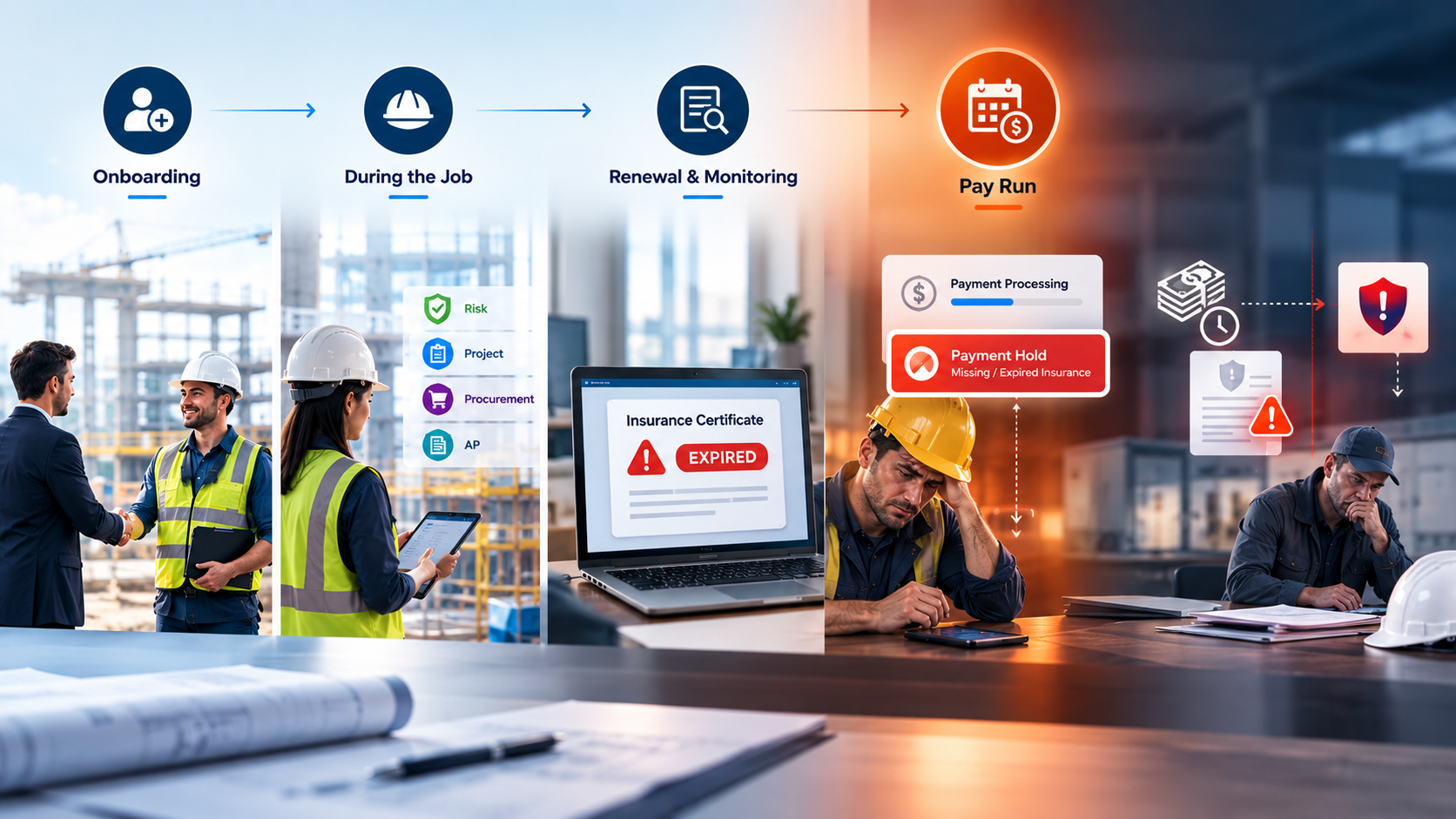
Payment often becomes the hardest compliance checkpoint. At onboarding, the focus is getting the sub started. During the job, renewal monitoring can fall between risk, project, procurement, and AP. Then the issue surfaces on pay run day, when the sub is waiting on cash.

Why Compliance Gaps Surface at Payment Time

That timing creates friction. Billd found that subcontractors wait an average of 51 days to get paid, and 64% report being slow paid by their GC. A compliance hold adds more pressure at an already sensitive point. The opposite mistake carries its own risk. Paying a subcontractor whose coverage has lapsed or fallen below contract requirements can leave the GC carrying risk that the subcontractor’s insurance was expected to address.

The goal is to surface compliance gaps before payment day, not discover them when payment is ready to go out.

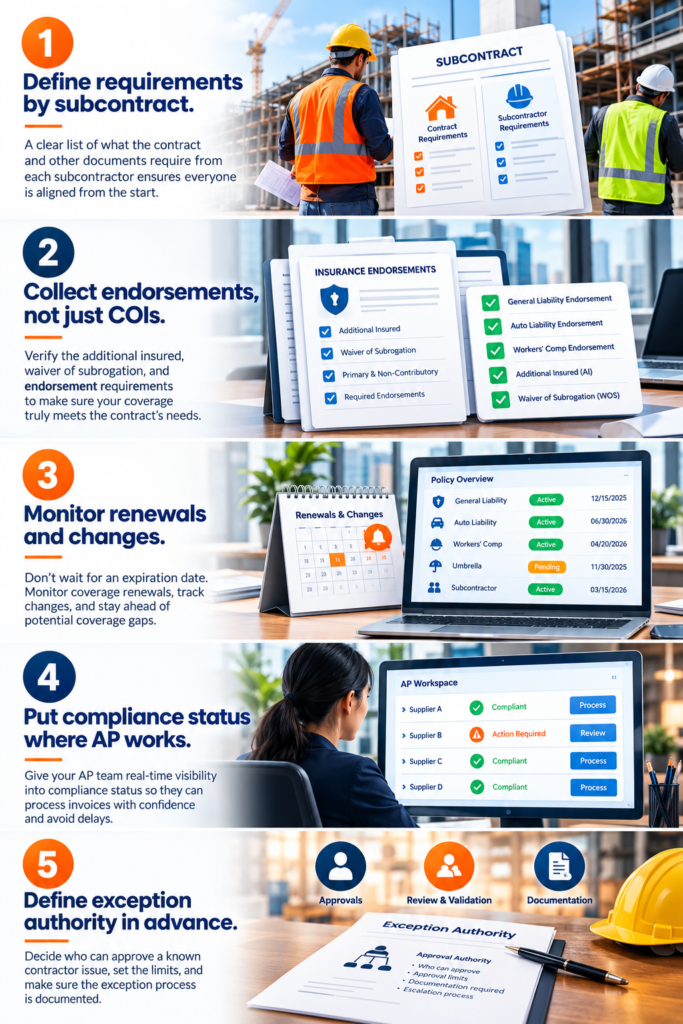
Five Steps to Stop Finding Compliance Gaps on Payment Day

Meet the Construction Risk & Compliance AI Worker

The Construction Risk & Compliance AI Worker keeps subcontractor compliance records current by reading incoming insurance documents, checking them against contract requirements, updating the ERP, and flagging gaps.

People make the decisions. The AI worker does not decide whether to hold payment, approve an exception, or accept a coverage shortfall.

What that looks like

A drywall subcontractor’s policy is up for renewal mid-project, with an $86,400 pay application due at month-end.

  • Weeks before expiration, the AI worker flags the renewal.
  • The broker sends a new certificate and endorsements. It reads them and finds two gaps: the umbrella dropped from the required $5 million to $2 million, and the completed-operations additional insured endorsement is missing.
  • It updates the ERP with the compliance status and flags the risk coordinator and PM.

The team now has weeks to address the gap before payment is due. AP sees the current status when the pay run arrives.

The checking is continuous. The decisions stay with your team.

The Bottom Line

A certificate on file tells you what a sub’s coverage looked like on one day. Subcontractor insurance compliance is about every day after that. When compliance is checked continuously and lands where payments are made, payment day becomes routine instead of a scramble, and your company isn’t carrying risk nobody knew about.

See how the Construction Risk & Compliance AI Worker keeps subcontractor compliance current, so payables can pay with confidence. Book a demo.

FAQs

Subcontractor insurance compliance means confirming that each subcontractor and vendor carries the insurance their contract requires: the right coverage types, limits, and endorsements (such as additional insured and waiver of subrogation), in force for the whole period the contract requires. It isn’t a one-time check, because policies renew, change, and get cancelled during a project.

No. The standard ACORD 25 certificate states that it is “issued as a matter of information only and confers no rights upon the certificate holder,” and that it does not amend, extend, or alter the coverage in the policies. Additional insured status and waivers of subrogation depend on the policy’s actual endorsements.

Both are common ISO additional insured endorsements. CG 20 10 generally applies to ongoing operations, while the work is being performed. CG 20 37 applies to completed operations, after the work is finished. Many construction contracts require both, so check what your contracts specify.

That depends on your subcontract terms and applicable law, so check with your legal and risk advisors. What matters operationally is that accounts payable knows a sub’s compliance status before the pay run, not after, so any decision to hold, pay, or approve an exception is made deliberately.

No. It validates documents, keeps compliance records current, updates the systems that need to know, including the ERP, and flags risk. Your team decides whether to hold a payment, request a corrected certificate, or approve an exception.

The Hazard Was There. The Log Wasn’t. Why Construction Teams Are Rethinking Safety Documentation

Construction sites move fast, and somewhere at that pace, a hazard gets spotted, mentally noted, and forgotten before it ever makes it into a safety log.

For field managers, the reality is familiar. A quick photo on a personal phone, a handwritten note buried in paperwork, or a safety observation that never gets formally documented. Not because anyone is careless, but because reporting is fragmented and competes with everything else happening on site.

The result? Gaps in documentation, incomplete safety records, and preventable hazards slipping through the cracks. Valuable time gets spent chasing photos, notes, and incomplete logs instead of resolving issues in the field.

That is where ProjectPro Field’s Hazard Detection Agent makes a difference. Built into an field-ready construction management solution powered by Microsoft, it allows teams to capture hazards during inspections or walkthroughs and turn them into structured safety logs in seconds.

Why Safety Logging Matters Beyond the Incident

In construction, safety documentation is often treated as a reaction, something you do after something goes wrong. But the strongest safety cultures are built through consistent, day-to-day logging of hazards and observations before they escalate.

Here’s where many field teams struggle:

  • Hazards are noticed in real time but never formally documented.
  • Safety observations often stay trapped in photos, texts, or handwritten notes.
  • Fragmented records make it difficult to identify recurring risks across projects or crews.
  • Small unresolved hazards can later resurface as near-misses or preventable incidents.
  • Valuable field time is spent chasing incomplete documentation instead of resolving issues.

Building a reliable safety process requires tools that match the pace of the field. Logging must be quick enough to happen in the moment, consistent enough to create usable records, and structured enough to help teams spot patterns before they become larger problems.

Introducing the Hazard Detection Agent in ProjectPro Field

Hazard Detection

The Hazard Detection Agent is ProjectPro Field’s built-in AI module designed for the people closest to the work: field managers, safety officers, and on-site supervisors.

It’s built for the pace of the field. Whether it’s part of a planned site walkthrough or a quick observation between tasks, the agent helps teams capture hazards when they are noticed, not hours later when details are harder to recall, and the moment has passed.

At its core, the Hazard Detection Agent organizes safety activity around two distinct log types:

  • Safety Incidents: Events that have already occurred, such as a worker slipping near an excavation. Documentation is immediate and factual.
  • Safety Observations: Potential hazards are spotted before they cause harm, such as an unmarked open hole near a walkway. Documentation is proactive and preventive.

The distinction matters. Incidents demand a response. Observations build a record that, over time, helps teams identify patterns, improve site awareness, and get ahead of risk before it becomes an event.

How It Works: The AI-Powered Reporting Flow

The Hazard Detection Agent turns a multi-step manual process into a fast, structured workflow, moving from photo to finalized log in minutes.

  1. Capture the scene: Field personnel take photos directly within ProjectPro Field while on-site. No switching between tools or uploading files later.
  2. AI hazard analysis: The Hazard Detection Agent analyzes the photo, identifies potential hazards, and generates a description of what it detects automatically.
  3. Auto-classification: The agent classifies the findings as either an incident or observation and assigns a severity level, giving every log a consistent structure from the start.
  4. User review and selection: Users review the agent’s findings, make edits if needed, and decide what to include in the final log. Humans stay in control of every decision.
  5. Auto-generated log entry: The system drafts the log details automatically, helping teams avoid repetitive manual data entry and speed up documentation.
  6. Submit for approval: Completed logs can be routed to safety officers or supervisors for review and sign-off directly within the app.

The Hazard Detection Agent does not replace the safety manager’s judgment. It reduces the time spent on data entry, so teams can focus more attention on field safety and faster responses to risk.

Key Benefits for Field Teams

The Hazard Detection Agent is not just a smarter way to log hazards. It changes how field teams experience safety documentation entirely.

1. Speed

Logging a hazard used to mean stepping away from the work, finding the right form, and piecing together details afterward. Now it can be completed in minutes, directly on-site and in the moment.

2. Accuracy

The Hazard Detection Agent automatically identifies and classifies hazards by type and severity, helping reduce inconsistencies that often come with manual entry across different people and job sites.

3. Consistency

Every log follows the same structure, regardless of who submits it or where it originates. That consistency makes records easier to review, compare, and act on over time.

4. Reduced Data Entry

Field staff spend less time filling out forms and more time focused on active site safety. The agent handles the initial description and classification, allowing teams to review and confirm instead of starting from scratch.

5. Approval Workflow

Safety officers and supervisors can review, comment on, and approve logs remotely within ProjectPro Field, helping teams avoid delays and disconnected communication.

The shift toward proactive safety management is already happening across the construction industry. AI-powered tools help teams capture hazards earlier, improve visibility across projects, and create more consistent field reporting processes.

Conclusion

Safety documentation has always competed with the pace of the field, and too often, the field wins. Field teams spot hazards, let moments pass, and fail to create logs that should exist.

The Hazard Detection Agent changes that. It handles data entry, analyzes the scene, generates descriptions, and classifies findings, allowing field teams to document hazards faster and more consistently in the moment.

The result is not just better records. It is less time spent on forms and more time focused on the work that actually keeps job sites safe.

Learn more: The CFO’s ERP Checklist Every Contractor Should Bring to CFMA 2026

Went to See It in Action?

We’re heading to the CFMA 2026 Annual Conference & Exhibition. Stop by booth #315 to see how ProjectPro Field is helping construction teams improve job site safety documentation.

CFMA

FAQs

Yes. Modern AI systems can analyze construction site images to identify visible risks such as exposed edges, blocked walkways, missing barriers, equipment hazards, and unsafe site conditions. AI helps teams document hazards faster and more consistently directly from the field.

AI is helping construction teams reduce manual reporting effort by automating parts of the documentation process. This includes image analysis, hazard classification, severity tagging, and structured log generation, allowing field teams to capture safety activity in real time.

Manual safety reporting often depends on handwritten notes, disconnected photos, delayed follow-ups, and after-the-fact data entry. On busy jobsites, that process can lead to incomplete records, inconsistent reporting, and missed observations.

Mobile-first construction safety reporting software allows hazards and observations to be captured directly from the jobsite. This improves reporting speed, reduces administrative effort, and helps ensure details are documented while the situation is still fresh.

Traditional safety forms rely entirely on manual input. A Hazard Detection Agent uses AI to assist with image analysis, issue descriptions, classification, and structured log creation, helping teams complete safety documentation faster and with greater consistency.

9 Ways to Know If Your Construction Payroll Software Is Actually Protecting Your Margins

Payroll errors usually don’t show up on payday. You notice them a week later when:

  • Your profit margin starts shrinking
  • Your WIP number looked inaccurate
  • Certified payroll reports are questionable
  • A job that seems profitable isn’t profitable anymore after the real labor cost is recorded.

In construction, labor is often the single largest cost driver.

Yet most of the contractors still rely on aged payroll systems that were built to fix paycheck issues, not to handle the construction job complexities.

That’s why it has become crucial to evaluate construction payroll software today through a different lens.

Not “Does it run payroll?”

But “Does it protect job cost accuracy, compliance, and profitability?”

If you’re assessing your current construction payroll management software, or considering a shift, here are nine indicators that separate basic payroll processing from construction-ready payroll intelligence.

1. Does Your Construction Payroll Software Structure Labor Before Payroll Runs?

The best construction payroll starts with job structure. Construction labor must be allocated by job, phase, and cost code; assigned proper skill and labor classifications; structured by shift differentials; and controlled through approval workflows.

Payroll engines calculate wages. They don’t enforce construction logic.

A more advanced model separates labor structure and job cost control from payroll calculation and tax processing, ensuring payroll receives clean, job-coded data, forming the foundation for accurate construction labor cost tracking.

2. Does It Support Payroll-to-Job Cost Reconciliation?

True construction payroll integration with job cost means regular pay, overtime, double time, fringes, and taxes are processed, and actual payroll results are imported back into job cost.

This reconciliation replaces estimated burden with real numbers. When automated, WIP reflects true labor cost, cost-to-complete becomes reliable, and real-time payroll reporting improves.

3. Can It Handle Prevailing Wage & Davis-Bacon Structuring Cleanly?

Effective prevailing wage payroll software applies wage determinations by project and location, tracks classification changes by effective date, supports Davis-Bacon reporting, and generates certified payroll-ready data.

Modern certified payroll software for construction embeds wage logic before payroll runs, ensuring compliance is proactive, not reactive.

4. Does It Meet Certified Payroll Reporting Requirements Without Extra Work?

Certified payroll reporting requires date-sensitive reporting, accurate trade classifications, historical reproducibility, and clean export capability.

Your construction payroll software should produce structured data that supports certified payroll reporting automatically.

5. Can It Manage Union & Multi-Trade Labor Complexity?

Union payroll management construction requires structured handling of multiple classifications per worker, shift premiums, trade-specific reporting, and overtime tracking.

Advanced construction payroll management software defines skill and labor classes, rate structures tied to job cost, and controlled time allocation by project.

6. Does It Offer Flexible Construction Time Tracking Integration?

Whether time is entered inside payroll or through construction time tracking integration, payroll integration with job cost must remain intact, approval workflows must enforce accuracy, and labor coding consistency must be maintained.

7. Does It Eliminate Double Entry Through Integration?

Modern construction payroll software supports payroll automation by sending structured time to payroll, importing actual payroll results automatically, and updating job costs without re-keying, reducing error rates and audit exposure.

8. Does It Deliver Real-Time Labor Cost Visibility?

True construction labor cost tracking software provides estimated vs actual comparisons, real-time job profitability, accurate cost-to-complete forecasting, and clear overtime tracking.

9. Does It Align Seamlessly With Your ERP?

For contractors running financials on ERP systems, construction payroll integration with job cost must be clean and automated.

A Microsoft-based construction payroll system delivers value when payroll logic supports job cost structure, not overrides it.

The Strategic Difference

Basic payroll systems process pay. Construction-ready construction payroll software structures labor, protects compliance, reconciles actual burden, and preserves job profitability.

That’s where Software like ProjectPro makes the difference, bringing labor structure, payroll reconciliation, and job cost reporting in one unified system.

With that foundation in place, payroll shifts from an administrative task to a margin protection strategy.

Want a deeper breakdown of payroll integration and certified reporting capabilities? Download the Payroll Integration and Certified Payroll brochures.

5 Proven Construction Project Planning Best Practices That Drive Results

Construction projects rarely fail because teams do not work hard enough. They fail because planning breaks down before execution even begins.

Recent industry insights from Deloitte (2024–2025 construction outlook) highlight that cost overruns and schedule delays remain among the biggest challenges for contractors globally, especially as projects grow in complexity and scale. At the same time, PwC reports that construction firms are increasingly investing in digital planning and project management tools to improve coordination and cost control.

Despite this, many projects still start with fragmented planning.

Schedules sit in one system. Budgets in another. Field execution follows assumptions instead of aligned plans. By the time issues surface, they are already expensive to fix.

This is why construction project planning is the foundation that determines whether a project stays predictable or becomes reactive.

The contractors who consistently deliver on time and on budget follow a structured planning approach. Not as a checklist, but as a discipline.

What Effective Construction Planning Actually
Looks Like

On a well-planned project, every team knows what needs to happen, when it needs to happen, and how it connects to cost and resources.

Project managers are not chasing updates. Finance teams are not reconciling gaps. Field teams are not waiting for clarity.

Everything flows from a plan that connects scope, schedule, resources, and financials. That level of coordination does not happen by chance. It comes from following the right construction project planning steps. Here’s how:

Define Clear Project Goals

Every successful project begins with alignment on what success actually means.This goes beyond defining deliverables. It includes financial targets, timelines, quality benchmarks, and stakeholder expectations.

When this clarity is missing, teams make decisions based on assumptions. Those assumptions later show up as delays, rework, or disputes.

Strong project planning in construction management starts by creating a shared understanding across all stakeholders. This becomes the reference point for every decision that follows.

Establish Scope and Key Deliverables

Once goals are set, the next construction planning step is defining the project’s scope.

Scope includes:

  • What Will Be Delivered
  • Materials, Systems, and Equipment Required
  • Quality and Compliance Standards
  • Work Excluded from the Contract

A detailed scope document eliminates ambiguity, reduces change orders, and enhances accountability.

Use collaborative workshops with the design team, subcontractors, and stakeholders to refine scope and avoid assumptions later.

Prioritize Internal Planning Before Execution

Before any work begins, the team must develop an actionable plan that addresses internal risks, resources, and timelines.

Key activities include:

  • Identify Risks and Assign Owners: Document potential risks (financial, schedule, safety) and assign responsibility for mitigation.
  • Align Resources and Budgets: Ensure labor, equipment, and funding are allocated and scheduled appropriately.
  • Assess Site Conditions and Logistics: Confirm permits, access, and infrastructure requirements are accounted for.

Focusing on internal preparation ensures the project team can make informed decisions and react effectively if conditions change.

Pro Tip: Document all risk mitigation strategies in a shared platform so team members can track accountability and progress.

Connect Design with Early Execution Planning

One of the biggest gaps in construction planning happens between design and execution.Design teams complete drawings. Field teams interpret them. And in between, misalignment creates delays and rework.

Integrating design with execution planning changes that. It allows teams to identify conflicts early, align schedules with actual build conditions, and ensure cost estimates reflect reality.

With tools like BIM and connected planning systems, this step is becoming essential rather than optional.

Validate Your Plan Before Breaking Ground

Before construction begins, conduct a comprehensive walkthrough to validate the plan, rather than rehashing alignment.

Key validation steps:

  • Final Scope and Design Check: Confirm deliverables match contract requirements.
  • Constructability Review: Ensure designs can be executed efficiently on-site.
  • Compliance Audit: Verify regulatory and safety standards are met.
  • Bid and Subcontractor Coordination: Confirm responsibilities and schedules with trade partners.

This step ensures gaps are caught early, minimizing costly mistakes and giving the team confidence to execute the project successfully.

Why Modern Contractors Prioritize a Structured
Planning Approach

Construction planning is evolving from static documents to connected systems. Over 78% of construction firms globally had adopted at least one digital project management tool by 2024 to improve schedule coordination, budgeting, and team collaboration.

A structured planning process helps contractors:

  • Minimize change orders
  • Reduce unexpected delays
  • Keep costs under control

Where ProjectPro Fits In

Modern planning requires more than spreadsheets and disconnected tools.

ProjectPro, built on Microsoft Dynamics 365 Business Central, connects project planning with financial management in one system.

This allows contractors to align budgets with execution in real time, track costs as work progresses, connect project planning with accounting and reporting .

Instead of managing planning and financials separately, teams operate with a unified view of the project.

Final Thoughts

Effective construction project planning goes beyond a simple checklist. It’s what sets the best contractors apart.

To reduce uncertainty and keep projects on schedule and within budget, many leading construction firms rely on ProjectPro.

This all-in-one construction ERP is built on Microsoft Dynamics 365 Business Central and backed by over 26 years of construction industry experience. It gives teams real-time visibility, streamlined workflows, and the insights they need to make smarter decisions on every project.

To discover how ProjectPro can transform the way you plan
and build, schedule a demo.

FAQs

Critical construction project planning steps include defining project goals, setting scope, developing a risk-aware plan, integrating design and execution, and conducting a full planning walkthrough before construction.

Construction project planning ensures clarity, reduces risks, aligns teams, and supports informed decision-making throughout the project lifecycle.

The construction project planning process includes goal definition, scope of development, risk planning, design integration, scheduling, and pre-construction review.

Modern teams use cloud-based project planning tools for construction, such as scheduling dashboards, BIM integration, centralized document sharing, and risk management systems.

Construction planning best practices include early stakeholder engagement, documented scope, aligned scheduling, integrated design, risk mitigation, and real-time collaboration.

Why 70% of Construction Firms are Moving to the Cloud (And Why You Should Too)

Construction projects today involve multiple teams, tight schedules, and constantly shifting costs. On top of that, managing everything through spreadsheets or disconnected tools can quickly lead to delays, miscommunication, and budget overruns.

That’s why many contractors are turning to cloud construction management software to manage projects more efficiently.

According to industry research, more than 70% of construction firms have adopted cloud technology to improve project visibility and collaboration. It highlights the rising need for technology in the construction industry.

Cloud platforms allow contractors to access project data from anywhere, track budgets in real time, and keep office and field teams aligned.

In this guide, we’ll explore five key benefits of cloud construction management software and why it’s becoming essential for modern construction companies.

Top 5 Benefits of Cloud Construction Management Software

The main benefits of cloud construction management software include the following:

1. Real-Time Project Visibility

One of the biggest advantages of cloud construction management software is real-time access to project data.

Project managers can track:

  • Project progress
  • Labor productivity
  • Budgets and cost performance
  • Material usage

Because all data is stored in a centralized system, contractors can identify potential issues early and make faster decisions.

2. Better Collaboration Between Office and Field Teams

Construction projects involve many stakeholders, including contractors, subcontractors, architects, and suppliers.

Cloud construction software allows teams to collaborate through shared dashboards, documents, and task updates.

Field teams can upload updates directly from job sites, while office teams can monitor progress and respond immediately.

This improves communication and reduces delays caused by outdated information.

3. Improved Cost Tracking and Budget Control

Cost overruns are one of the biggest challenges in construction.

With construction software for contractors, project managers can monitor:

  • Labor costs
  • Material expenses
  • Subcontractor payments
  • Equipment costs

Real-time financial visibility helps contractors identify cost issues early and maintain tighter control over project budgets.

4. Faster Project Scheduling and Time Management

Construction schedules change frequently due to weather, supply delays, or design updates.

Cloud-based construction management tools allow project managers to:

  • Update schedules instantly
  • Assign tasks to teams
  • Monitor progress across projects

This helps contractors adjust quickly and keep projects on track.

5. Scalability for Growing Construction Companies

As construction companies grow, managing multiple projects becomes more complex.

Cloud systems allow contractors to add users, projects, and features without investing in additional IT infrastructure.

This makes cloud construction management software a practical solution for both small contractors and large construction firms.

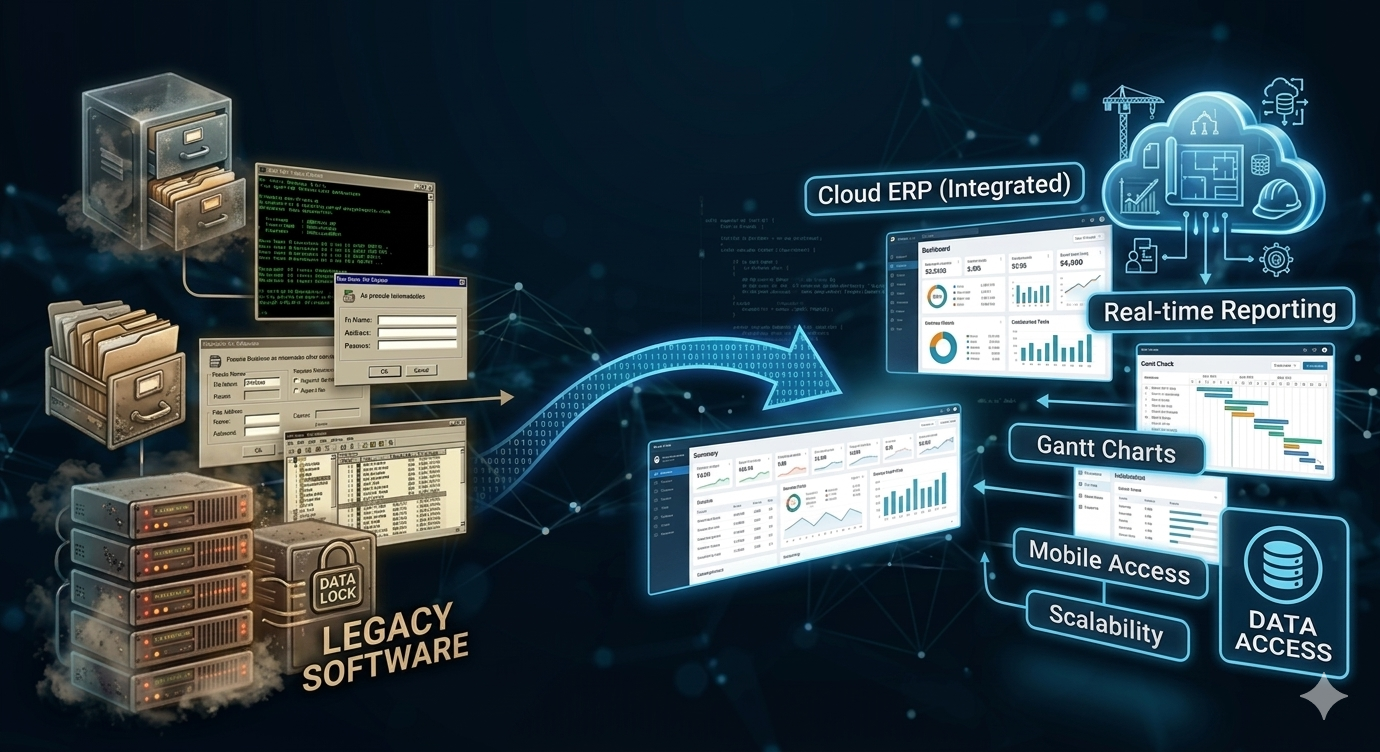
From Legacy Software to Cloud ERP for Construction Companies

cloud ERP

While many contractors begin with basic project management tools, growing construction firms often require deeper financial and operational visibility.

This is where cloud ERP for construction companies becomes valuable.

Cloud ERP platforms connect project management with accounting, job costing, procurement, and financial reporting in one system. This gives contractors a complete view of both project performance and company finances.

How ProjectPro Helps Construction Companies Manage Projects in the Cloud

Modern construction companies need more than just project tracking tools. They need a connected platform that links project management with financial management.

That’s where ProjectPro steps in. Built on Microsoft Dynamics 365 Business Central, ProjectPro helps contractors manage projects, job costs, and financial operations from a single system.

With ProjectPro, construction companies can:

  • Track labor and material costs by job
  • Monitor project budgets in real time
  • Manage subcontractors and resources
  • Automate billing and financial reporting
  • Gain full visibility into project profitability

By centralizing project and financial data, ProjectPro helps contractors make better decisions and deliver projects more efficiently.

Ready to Take Control of Your Construction Projects?

Managing projects with disconnected tools or spreadsheets can lead to delays, miscommunication, and rising costs.

With ProjectPro, contractors can manage projects, finances, and job costs on a single cloud platform. Gain real-time visibility, improve collaboration, and keep your projects on track from start to finish.

To see how ProjectPro helps construction companies work smarter, connect with a ProjectPro specialist today.

FAQs

Cloud construction management software is a digital platform that allows contractors to manage project schedules, budgets, documents, and teams through an online system accessible from any location.

Contractors use cloud construction management software to improve project visibility, streamline communication between field and office teams, and track project costs more accurately.

Cloud ERP for construction companies integrates project management, accounting, job costing, and financial reporting into a single cloud-based platform.

Construction software for contractors should include:

  • Project scheduling
  • Job costing
  • Document management
  • Budget tracking
  • Real-time reporting
  • Collaboration tools

Construction planning best practices include early stakeholder engagement, documented scope, aligned scheduling, integrated design, risk mitigation, and real-time collaboration.