All-In-One Construction Accounting Software

9 Ways to Know If Your Construction Payroll Software Is Actually Protecting Your Margins

Payroll errors usually don’t show up on payday. You notice them a week later when:

  • Your profit margin starts shrinking
  • Your WIP number looked inaccurate
  • Certified payroll reports are questionable
  • A job that seems profitable isn’t profitable anymore after the real labor cost is recorded.

In construction, labor is often the single largest cost driver.

Yet most of the contractors still rely on aged payroll systems that were built to fix paycheck issues, not to handle the construction job complexities.

That’s why it has become crucial to evaluate construction payroll software today through a different lens.

Not “Does it run payroll?”

But “Does it protect job cost accuracy, compliance, and profitability?”

If you’re assessing your current construction payroll management software, or considering a shift, here are nine indicators that separate basic payroll processing from construction-ready payroll intelligence.

1. Does Your Construction Payroll Software Structure Labor Before Payroll Runs?

The best construction payroll starts with job structure. Construction labor must be allocated by job, phase, and cost code; assigned proper skill and labor classifications; structured by shift differentials; and controlled through approval workflows.

Payroll engines calculate wages. They don’t enforce construction logic.

A more advanced model separates labor structure and job cost control from payroll calculation and tax processing, ensuring payroll receives clean, job-coded data, forming the foundation for accurate construction labor cost tracking.

2. Does It Support Payroll-to-Job Cost Reconciliation?

True construction payroll integration with job cost means regular pay, overtime, double time, fringes, and taxes are processed, and actual payroll results are imported back into job cost.

This reconciliation replaces estimated burden with real numbers. When automated, WIP reflects true labor cost, cost-to-complete becomes reliable, and real-time payroll reporting improves.

3. Can It Handle Prevailing Wage & Davis-Bacon Structuring Cleanly?

Effective prevailing wage payroll software applies wage determinations by project and location, tracks classification changes by effective date, supports Davis-Bacon reporting, and generates certified payroll-ready data.

Modern certified payroll software for construction embeds wage logic before payroll runs, ensuring compliance is proactive, not reactive.

4. Does It Meet Certified Payroll Reporting Requirements Without Extra Work?

Certified payroll reporting requires date-sensitive reporting, accurate trade classifications, historical reproducibility, and clean export capability.

Your construction payroll software should produce structured data that supports certified payroll reporting automatically.

5. Can It Manage Union & Multi-Trade Labor Complexity?

Union payroll management construction requires structured handling of multiple classifications per worker, shift premiums, trade-specific reporting, and overtime tracking.

Advanced construction payroll management software defines skill and labor classes, rate structures tied to job cost, and controlled time allocation by project.

6. Does It Offer Flexible Construction Time Tracking Integration?

Whether time is entered inside payroll or through construction time tracking integration, payroll integration with job cost must remain intact, approval workflows must enforce accuracy, and labor coding consistency must be maintained.

7. Does It Eliminate Double Entry Through Integration?

Modern construction payroll software supports payroll automation by sending structured time to payroll, importing actual payroll results automatically, and updating job costs without re-keying, reducing error rates and audit exposure.

8. Does It Deliver Real-Time Labor Cost Visibility?

True construction labor cost tracking software provides estimated vs actual comparisons, real-time job profitability, accurate cost-to-complete forecasting, and clear overtime tracking.

9. Does It Align Seamlessly With Your ERP?

For contractors running financials on ERP systems, construction payroll integration with job cost must be clean and automated.

A Microsoft-based construction payroll system delivers value when payroll logic supports job cost structure, not overrides it.

The Strategic Difference

Basic payroll systems process pay. Construction-ready construction payroll software structures labor, protects compliance, reconciles actual burden, and preserves job profitability.

That’s where Software like ProjectPro makes the difference, bringing labor structure, payroll reconciliation, and job cost reporting in one unified system.

With that foundation in place, payroll shifts from an administrative task to a margin protection strategy.

Want a deeper breakdown of payroll integration and certified reporting capabilities? Download the Payroll Integration and Certified Payroll brochures.
5 Proven Construction Project Planning Best Practices That Drive Results

Construction projects rarely fail because teams do not work hard enough. They fail because planning breaks down before execution even begins.

Recent industry insights from Deloitte (2024–2025 construction outlook) highlight that cost overruns and schedule delays remain among the biggest challenges for contractors globally, especially as projects grow in complexity and scale. At the same time, PwC reports that construction firms are increasingly investing in digital planning and project management tools to improve coordination and cost control.

Despite this, many projects still start with fragmented planning.

Schedules sit in one system. Budgets in another. Field execution follows assumptions instead of aligned plans. By the time issues surface, they are already expensive to fix.

This is why construction project planning is the foundation that determines whether a project stays predictable or becomes reactive.

The contractors who consistently deliver on time and on budget follow a structured planning approach. Not as a checklist, but as a discipline.

What Effective Construction Planning Actually
Looks Like

On a well-planned project, every team knows what needs to happen, when it needs to happen, and how it connects to cost and resources.

Project managers are not chasing updates. Finance teams are not reconciling gaps. Field teams are not waiting for clarity.

Everything flows from a plan that connects scope, schedule, resources, and financials. That level of coordination does not happen by chance. It comes from following the right construction project planning steps. Here’s how:

Define Clear Project Goals

Every successful project begins with alignment on what success actually means.This goes beyond defining deliverables. It includes financial targets, timelines, quality benchmarks, and stakeholder expectations.

When this clarity is missing, teams make decisions based on assumptions. Those assumptions later show up as delays, rework, or disputes.

Strong project planning in construction management starts by creating a shared understanding across all stakeholders. This becomes the reference point for every decision that follows.

Establish Scope and Key Deliverables

Once goals are set, the next construction planning step is defining the project’s scope.

Scope includes:

  • What Will Be Delivered
  • Materials, Systems, and Equipment Required
  • Quality and Compliance Standards
  • Work Excluded from the Contract

A detailed scope document eliminates ambiguity, reduces change orders, and enhances accountability.

Use collaborative workshops with the design team, subcontractors, and stakeholders to refine scope and avoid assumptions later.

Prioritize Internal Planning Before Execution

Before any work begins, the team must develop an actionable plan that addresses internal risks, resources, and timelines.

Key activities include:

  • Identify Risks and Assign Owners: Document potential risks (financial, schedule, safety) and assign responsibility for mitigation.
  • Align Resources and Budgets: Ensure labor, equipment, and funding are allocated and scheduled appropriately.
  • Assess Site Conditions and Logistics: Confirm permits, access, and infrastructure requirements are accounted for.

Focusing on internal preparation ensures the project team can make informed decisions and react effectively if conditions change.

Pro Tip: Document all risk mitigation strategies in a shared platform so team members can track accountability and progress.

Connect Design with Early Execution Planning

One of the biggest gaps in construction planning happens between design and execution.Design teams complete drawings. Field teams interpret them. And in between, misalignment creates delays and rework.

Integrating design with execution planning changes that. It allows teams to identify conflicts early, align schedules with actual build conditions, and ensure cost estimates reflect reality.

With tools like BIM and connected planning systems, this step is becoming essential rather than optional.

Validate Your Plan Before Breaking Ground

Before construction begins, conduct a comprehensive walkthrough to validate the plan, rather than rehashing alignment.

Key validation steps:

  • Final Scope and Design Check: Confirm deliverables match contract requirements.
  • Constructability Review: Ensure designs can be executed efficiently on-site.
  • Compliance Audit: Verify regulatory and safety standards are met.
  • Bid and Subcontractor Coordination: Confirm responsibilities and schedules with trade partners.

This step ensures gaps are caught early, minimizing costly mistakes and giving the team confidence to execute the project successfully.

Why Modern Contractors Prioritize a Structured
Planning Approach

Construction planning is evolving from static documents to connected systems. Over 78% of construction firms globally had adopted at least one digital project management tool by 2024 to improve schedule coordination, budgeting, and team collaboration.

A structured planning process helps contractors:

  • Minimize change orders
  • Reduce unexpected delays
  • Keep costs under control

Where ProjectPro Fits In

Modern planning requires more than spreadsheets and disconnected tools.

ProjectPro, built on Microsoft Dynamics 365 Business Central, connects project planning with financial management in one system.

This allows contractors to align budgets with execution in real time, track costs as work progresses, connect project planning with accounting and reporting .

Instead of managing planning and financials separately, teams operate with a unified view of the project.

Final Thoughts

Effective construction project planning goes beyond a simple checklist. It’s what sets the best contractors apart.

To reduce uncertainty and keep projects on schedule and within budget, many leading construction firms rely on ProjectPro.

This all-in-one construction ERP is built on Microsoft Dynamics 365 Business Central and backed by over 26 years of construction industry experience. It gives teams real-time visibility, streamlined workflows, and the insights they need to make smarter decisions on every project.

To discover how ProjectPro can transform the way you plan
and build, schedule a demo.

FAQs

Critical construction project planning steps include defining project goals, setting scope, developing a risk-aware plan, integrating design and execution, and conducting a full planning walkthrough before construction.

Construction project planning ensures clarity, reduces risks, aligns teams, and supports informed decision-making throughout the project lifecycle.

The construction project planning process includes goal definition, scope of development, risk planning, design integration, scheduling, and pre-construction review.

Modern teams use cloud-based project planning tools for construction, such as scheduling dashboards, BIM integration, centralized document sharing, and risk management systems.

Construction planning best practices include early stakeholder engagement, documented scope, aligned scheduling, integrated design, risk mitigation, and real-time collaboration.

Why 70% of Construction Firms are Moving to the Cloud (And Why You Should Too)

Construction projects today involve multiple teams, tight schedules, and constantly shifting costs. On top of that, managing everything through spreadsheets or disconnected tools can quickly lead to delays, miscommunication, and budget overruns.

That’s why many contractors are turning to cloud construction management software to manage projects more efficiently.

According to industry research, more than 70% of construction firms have adopted cloud technology to improve project visibility and collaboration. It highlights the rising need for technology in the construction industry.

Cloud platforms allow contractors to access project data from anywhere, track budgets in real time, and keep office and field teams aligned.

In this guide, we’ll explore five key benefits of cloud construction management software and why it’s becoming essential for modern construction companies.

Top 5 Benefits of Cloud Construction Management Software

The main benefits of cloud construction management software include the following:

1. Real-Time Project Visibility

One of the biggest advantages of cloud construction management software is real-time access to project data.

Project managers can track:

  • Project progress
  • Labor productivity
  • Budgets and cost performance
  • Material usage

Because all data is stored in a centralized system, contractors can identify potential issues early and make faster decisions.

2. Better Collaboration Between Office and Field Teams

Construction projects involve many stakeholders, including contractors, subcontractors, architects, and suppliers.

Cloud construction software allows teams to collaborate through shared dashboards, documents, and task updates.

Field teams can upload updates directly from job sites, while office teams can monitor progress and respond immediately.

This improves communication and reduces delays caused by outdated information.

3. Improved Cost Tracking and Budget Control

Cost overruns are one of the biggest challenges in construction.

With construction software for contractors, project managers can monitor:

  • Labor costs
  • Material expenses
  • Subcontractor payments
  • Equipment costs

Real-time financial visibility helps contractors identify cost issues early and maintain tighter control over project budgets.

4. Faster Project Scheduling and Time Management

Construction schedules change frequently due to weather, supply delays, or design updates.

Cloud-based construction management tools allow project managers to:

  • Update schedules instantly
  • Assign tasks to teams
  • Monitor progress across projects

This helps contractors adjust quickly and keep projects on track.

5. Scalability for Growing Construction Companies

As construction companies grow, managing multiple projects becomes more complex.

Cloud systems allow contractors to add users, projects, and features without investing in additional IT infrastructure.

This makes cloud construction management software a practical solution for both small contractors and large construction firms.

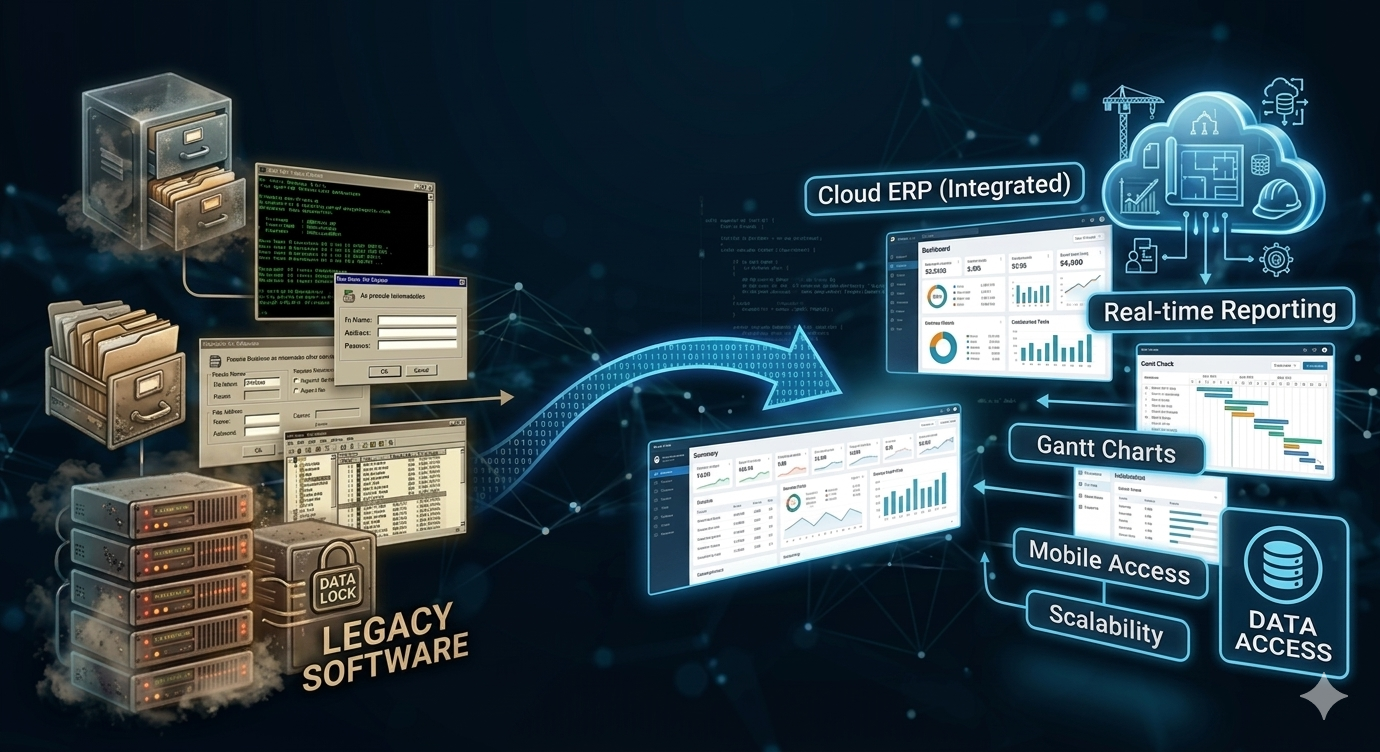
From Legacy Software to Cloud ERP for Construction Companies

cloud ERP

While many contractors begin with basic project management tools, growing construction firms often require deeper financial and operational visibility.

This is where cloud ERP for construction companies becomes valuable.

Cloud ERP platforms connect project management with accounting, job costing, procurement, and financial reporting in one system. This gives contractors a complete view of both project performance and company finances.

How ProjectPro Helps Construction Companies Manage Projects in the Cloud

Modern construction companies need more than just project tracking tools. They need a connected platform that links project management with financial management.

That’s where ProjectPro steps in. Built on Microsoft Dynamics 365 Business Central, ProjectPro helps contractors manage projects, job costs, and financial operations from a single system.

With ProjectPro, construction companies can:

  • Track labor and material costs by job
  • Monitor project budgets in real time
  • Manage subcontractors and resources
  • Automate billing and financial reporting
  • Gain full visibility into project profitability

By centralizing project and financial data, ProjectPro helps contractors make better decisions and deliver projects more efficiently.

Ready to Take Control of Your Construction Projects?

Managing projects with disconnected tools or spreadsheets can lead to delays, miscommunication, and rising costs.

With ProjectPro, contractors can manage projects, finances, and job costs on a single cloud platform. Gain real-time visibility, improve collaboration, and keep your projects on track from start to finish.

To see how ProjectPro helps construction companies work smarter, connect with a ProjectPro specialist today.

FAQs

Cloud construction management software is a digital platform that allows contractors to manage project schedules, budgets, documents, and teams through an online system accessible from any location.

Contractors use cloud construction management software to improve project visibility, streamline communication between field and office teams, and track project costs more accurately.

Cloud ERP for construction companies integrates project management, accounting, job costing, and financial reporting into a single cloud-based platform.

Construction software for contractors should include:

  • Project scheduling
  • Job costing
  • Document management
  • Budget tracking
  • Real-time reporting
  • Collaboration tools

Construction planning best practices include early stakeholder engagement, documented scope, aligned scheduling, integrated design, risk mitigation, and real-time collaboration.